



About this app
Finger Draw helps preschoolers and kindergarteners learn to write their capital
letters and numbers — one guided stroke at a time.
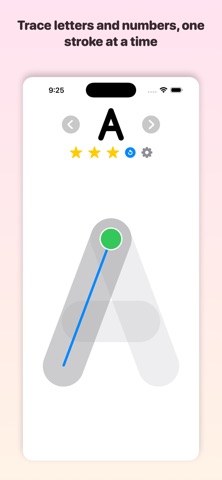
Children trace each letter and number with a finger or Apple Pencil, following
a friendly moving guide that shows exactly where to start and which way to go.
As they get better, the app quietly steps back: first the guide fades, then the
outline disappears, until they're writing each character all on their own.
Every attempt earns up to three stars for neatness, with cheerful animations
and encouragement along the way. It's built to feel like play, not practice.
WHY PARENTS AND TEACHERS LIKE IT
• Learn by doing — trace with a finger or Apple Pencil
• Proper letter formation — correct starting point and stroke order
• Three levels that grow with your child:
1. Trace — follow the moving guide, stroke by stroke
2. Outline — trace the shape in any order
3. Draw — write it from memory on a blank space
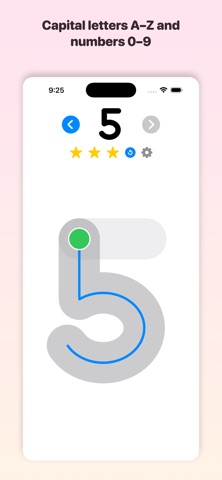
• Capital letters A–Z, then numbers 0–9
• Up to three stars for neat writing, with fun rewards
• Gentle spoken prompts and praise
• Adjustable letter size for little hands
• Works great on iPhone and iPad
SAFE AND PRIVATE BY DESIGN
• No ads
• No in-app purchases
• No accounts or sign-ups
• No internet connection — works fully offline
• Collects no data whatsoever
Finger Draw is a calm, screen-friendly way to build the fine-motor skills and
letter recognition that come before reading and writing. Hand your child the
iPad and let them discover how good it feels to make their first letters.
letters and numbers — one guided stroke at a time.
Children trace each letter and number with a finger or Apple Pencil, following
a friendly moving guide that shows exactly where to start and which way to go.
As they get better, the app quietly steps back: first the guide fades, then the
outline disappears, until they're writing each character all on their own.
Every attempt earns up to three stars for neatness, with cheerful animations
and encouragement along the way. It's built to feel like play, not practice.
WHY PARENTS AND TEACHERS LIKE IT
• Learn by doing — trace with a finger or Apple Pencil
• Proper letter formation — correct starting point and stroke order
• Three levels that grow with your child:
1. Trace — follow the moving guide, stroke by stroke
2. Outline — trace the shape in any order
3. Draw — write it from memory on a blank space
• Capital letters A–Z, then numbers 0–9
• Up to three stars for neat writing, with fun rewards
• Gentle spoken prompts and praise
• Adjustable letter size for little hands
• Works great on iPhone and iPad
SAFE AND PRIVATE BY DESIGN
• No ads
• No in-app purchases
• No accounts or sign-ups
• No internet connection — works fully offline
• Collects no data whatsoever
Finger Draw is a calm, screen-friendly way to build the fine-motor skills and
letter recognition that come before reading and writing. Hand your child the
iPad and let them discover how good it feels to make their first letters.
Version
1.0
Category
Education, Games, Word
Requires
iOS 15.0+
Price
Free